
Sending error
The sending errors are arranged on the right-hand side of the sending report.
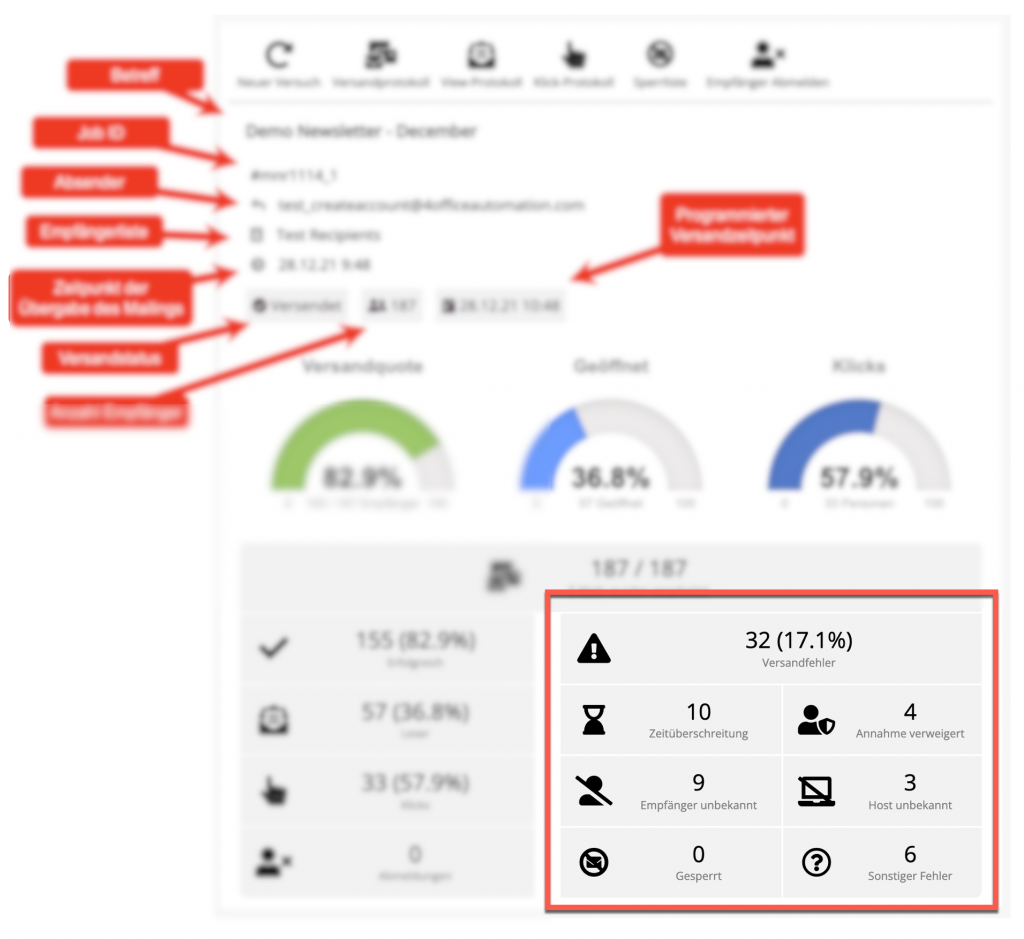
There are a total of six different categories of sending errors, which are handled differently. If you click on one of the fields, a window with detailed statistics and the corresponding log for all affected addresses is displayed:
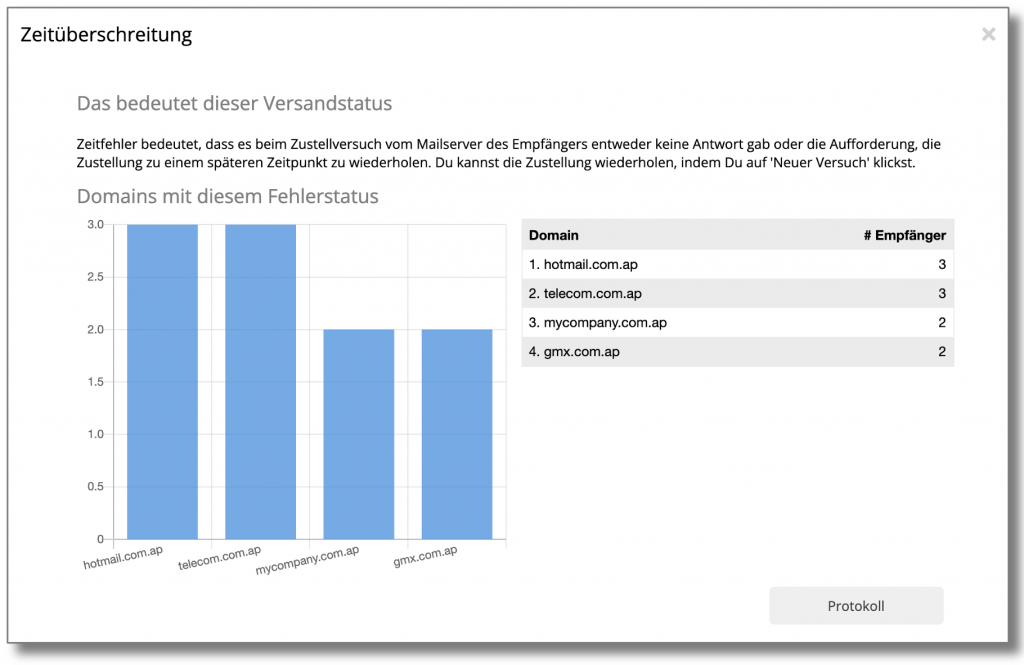
At the top is a brief explanation of the error, below it is a graphic showing the domains for which this error occurs most frequently. With the button Show protocol the log can be displayed for all recipients with this error.
Timeout
During the delivery attempt, the server either received no response from the recipient's mail server or was instructed by the recipient to repeat the delivery at a later time.
The system automatically makes up to 10 attempts to deliver emails to addresses with such an error message. If an email has still not been delivered, the status remains Timeout for the time being.
It is possible to initiate delivery to emails with this status again in the dispatch report. To do this, click on the New attempt in the toolbar.
Acceptance denied (Relay Denied)
This error message means that the recipient's mail server is temporarily (in some cases permanently, if the status code is greater than 500) refusing to accept the emails. This can have one of the following causes:
- The content of the email has been classified as spam
- Too many emails were sent in too short a time
- People have marked your emails as spam or deleted them immediately
- The reputation of the sender address is too low
- The sender IP of the emails has changed
- The recipient's mailbox is full and cannot receive any more emails
Recipient unknown (User unknown)
When trying to deliver an email to this address, our server received a message from the recipient's server that the address was unknown or did not exist.
Because regular attempts to send emails to non-existent addresses are regularly punished by block listing the sending IP, our system automatically excludes addresses reported as invalid from future mailings. The log then simply shows "500 Unknown user" as the sending status, while the error message for addresses reported as invalid for the first time is more detailed, e.g. "Recipient address rejected: User unknown in virtual mailbox table".
It has happened in the past that such an "unknown" response was sent by a spam filter instead of an "acceptance denied". Unfortunately, this cannot be distinguished from regular invalid email addresses.
In some cases, such an inactive email address can be reactivated after a few months and used as a "spam trap". If you send emails to such a "spam trap", it is possible that all your emails will be marked as spam in the future and delivery will be refused.
It can happen that email addresses to which you send emails with your email client are displayed as unknown be reported. This may be for the following reasons:
- The address is invalid, but the recipient server fails to inform you of this.
- A spam filter classifies your email as spam, but returns the message "unknown" to get you to remove the address from the mailing list.
- The address was temporarily invalid and is now active again. Caution: This could be a spam trap!
Attempts to send emails to unknown addresses are therefore associated with a high risk of block listing your own sending IP. If an address that you know to be valid with 100% has been marked as "unknown", please contact our customer service.
Host unknown (Unknown host)
The recipient's mail server does not exist or cannot be reached. This may be for one of the following reasons:
- There is a spelling mistake in the email address
- The server is temporarily or permanently unavailable, e.g. due to maintenance work or because it is not connected to the Internet.
- The recipient's domain is not correctly configured for reception, for example because an MX entry is missing in the recipient's DNS
For unknown hosts, check whether the address is spelled correctly and whether the domain still exists.
Locked
These recipients have unsubscribed from a mailing in the past and are on the block list, i.e. they do not wish to receive any further mailings in the future. They can unsubscribe in one of the following ways:
- Unsubscribe using our unsubscribe form
- Use of the list unsubscribe function of programs such as Microsoft Outlook
- There were complaints about spam from the address
- You have manually blocked the address
Other errors
An error that is not described in detail has occurred. In most cases, there is either irregular behavior on the recipient's email server or it is a refused acceptance. The error description in the dispatch log often provides more detailed information about the cause, in most cases it is an unknown address or a refused acceptance.
 Deutsch
  English