
Set up sending authorization
Damit mailfino E-Mails mit deiner eigenen Absenderdomain versenden kann, muss die Domain den Versand ausdrücklich erlauben. Dafür hinterlegst du bei deinem DNS-Anbieter drei TXT-Einträge: SPF, DKIM und DMARC. Diese Einträge verbessern die Zustellbarkeit und helfen empfangenden Mailservern, gefälschte Nachrichten zu erkennen.
DNS-Konfiguration öffnen
- Öffne im Newsletter-Editor den Schritt Send.
- Wähle die Absenderadresse aus, für deren Domain du die Einträge einrichten möchtest.
- Öffne die DNS-Konfiguration.
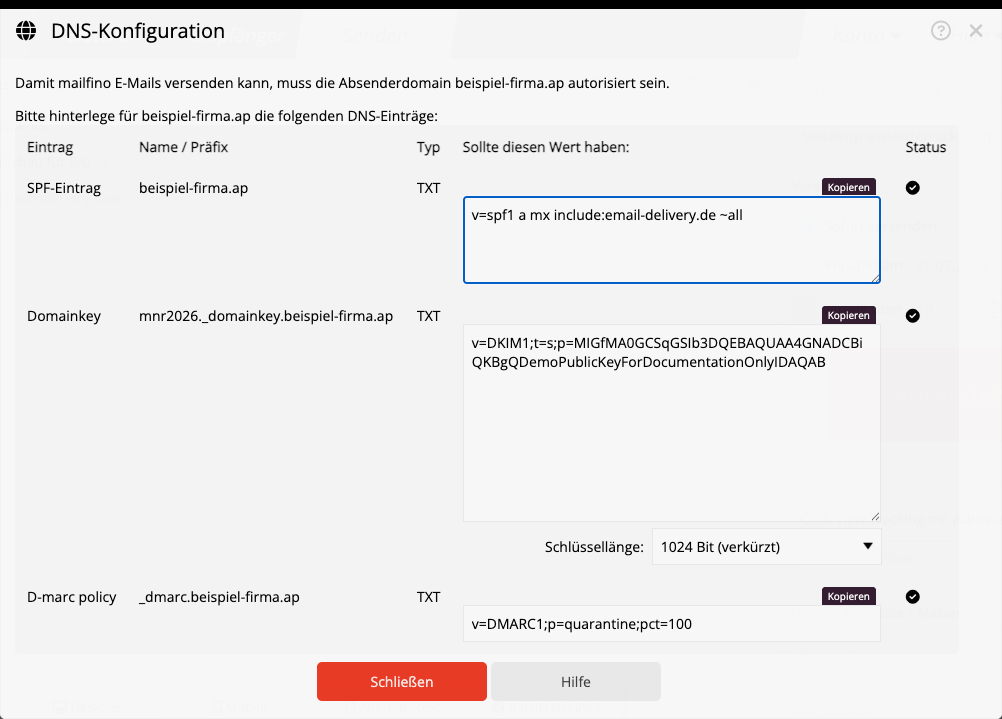
Der Dialog zeigt die Einträge für die Domain der ausgewählten Absenderadresse. Kopiere Name und Wert jeweils vollständig und gib sie an die Person weiter, die die DNS-Einstellungen der Domain verwaltet.
SPF-Eintrag hinterlegen
Der SPF-Eintrag legt fest, welche Server E-Mails für deine Domain versenden dürfen. Hinterlege den im Dialog angezeigten TXT-Wert bei deiner Domain.
Für eine Domain darf es nur einen SPF-TXT-Eintrag geben. Wenn bereits ein SPF-Eintrag vorhanden ist, darf kein zweiter angelegt werden. Bitte den vorhandenen Eintrag durch den DNS-Administrator so ergänzen lassen, dass er auch den von mailfino angezeigten Wert enthält.
DKIM-Eintrag hinterlegen
DKIM versieht jede Nachricht mit einer digitalen Signatur. mailfino bewahrt den privaten Schlüssel sicher auf; nur der öffentliche Schlüssel aus dem Dialog wird als TXT-Eintrag bei deiner Domain hinterlegt.
Standardmäßig verwendet mailfino einen 2048-Bit-Schlüssel. Diese Länge ist empfohlen und sollte verwendet werden, wenn dein DNS-Anbieter lange TXT-Werte unterstützt. Manche ältere DNS-Oberflächen oder Anbieter können den längeren Wert nicht speichern. Wähle in diesem Fall unterhalb des DKIM-Textfelds 1024 Bit (verkürzt).
Wenn du die Schlüssellänge änderst und die Rückfrage bestätigst, erzeugt mailfino ein neues Schlüsselpaar. Der bisherige private Schlüssel wird dadurch ersetzt. Kopiere anschließend den neu angezeigten DKIM-Wert und veröffentliche ihn sofort bei deinem DNS-Anbieter. Bis der neue Eintrag verfügbar ist, können Nachrichten mit diesem DomainKey nicht signiert werden.
Ändere die Schlüssellänge deshalb nur, wenn es erforderlich ist, und wechsle nicht zwischen beiden Varianten hin und her.
DMARC-Eintrag hinterlegen
Der DMARC-Eintrag legt fest, wie empfangende Mailserver mit Nachrichten umgehen sollen, die SPF oder DKIM nicht bestehen. Übernimm auch hierfür den im Dialog angezeigten TXT-Eintrag. Wenn für _dmarc bereits ein Eintrag existiert, stimme eine Änderung mit dem DNS-Administrator ab, damit bestehende Regeln nicht unbeabsichtigt überschrieben werden.
Prüfen und Fehler beheben
Nach dem Speichern kann es je nach DNS-Anbieter einige Zeit dauern, bis die Änderungen weltweit verfügbar sind. Öffne die DNS-Konfiguration später erneut:
- Ein grünes Häkchen bedeutet, dass mailfino den jeweiligen Eintrag gefunden und geprüft hat.
- Ein rotes Ausrufezeichen bedeutet, dass der Eintrag noch fehlt, nicht exakt zum angezeigten Wert passt oder noch nicht überall veröffentlicht wurde.
Wird die DNS-Konfiguration nicht geladen, wähle die Absenderadresse noch einmal aus und prüfe, ob ihre Domain vollständig eingetragen ist. Für Änderungen an SPF, DKIM und DMARC brauchst du Zugriff auf die DNS-Verwaltung der Absenderdomain oder Unterstützung durch deren Administrator.
For mailfino to send email using your own sender domain, the domain must explicitly authorize that delivery. Add three TXT records at your DNS provider: SPF, DKIM, and DMARC. These records improve deliverability and help receiving mail servers identify forged messages.
Open DNS configuration
- In the newsletter editor, open the Send step.
- Select the sender address whose domain you want to configure.
- Open DNS Configuration.
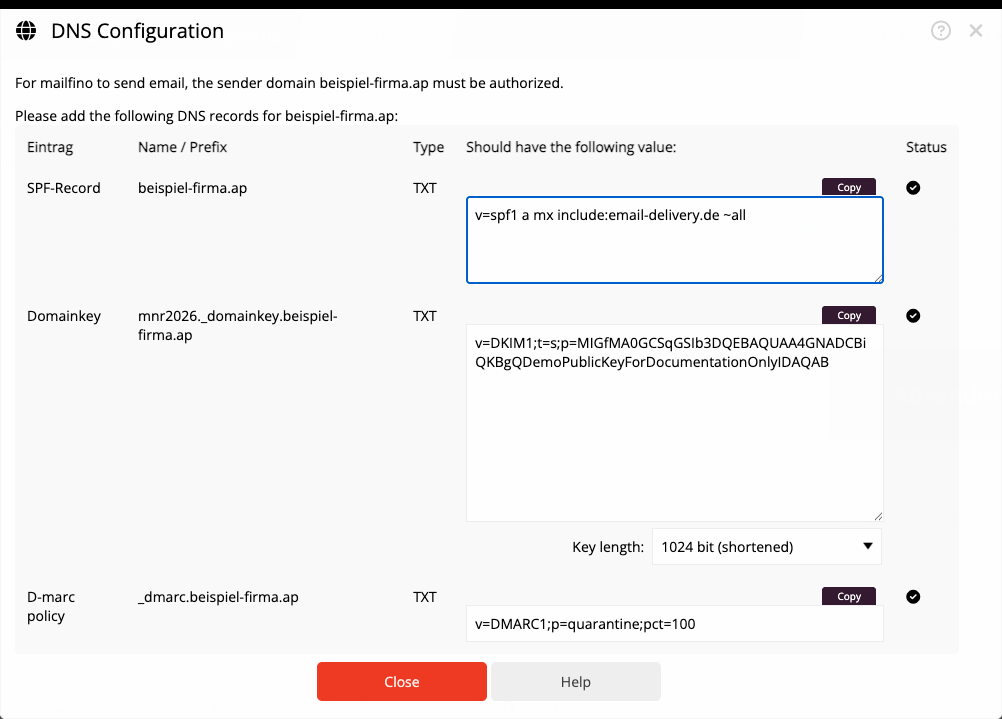
The dialog displays the records for the domain of the selected sender address. Copy each record name and value completely, then send them to the person who manages the domain’s DNS settings.
Add the SPF record
The SPF record defines which servers are allowed to send email for your domain. Add the TXT value displayed in the dialog to your domain.
Only one SPF TXT record may exist for a domain. If an SPF record already exists, do not create a second one. Ask the DNS administrator to extend the existing record so it also includes the value displayed by mailfino.
Add the DKIM record
DKIM adds a digital signature to every message. mailfino keeps the private key secure; only the public key displayed in the dialog is added as a TXT record for your domain.
By default, mailfino uses a 2048-bit key. This length is recommended and should be used when your DNS provider supports long TXT values. Some older DNS interfaces or providers cannot store the longer value. In that case, choose 1024 bit (shortened) below the DKIM text box.
When you change the key length and confirm the prompt, mailfino creates a new key pair. This replaces the previous private key. Then copy the newly displayed DKIM value and publish it with your DNS provider immediately. Until the new record is available, messages cannot be signed with this DomainKey.
Only change the key length when necessary, and do not switch between the two variants repeatedly.
Add the DMARC record
The DMARC record defines how receiving mail servers should handle messages that fail SPF or DKIM. Add the TXT record displayed in the dialog for this purpose as well. If a record for _dmarc already exists, coordinate the change with the DNS administrator so existing rules are not overwritten unintentionally.
Check and troubleshoot
After saving the changes, it can take some time before they are available worldwide, depending on your DNS provider. Open DNS Configuration again later:
- A green check mark means mailfino found and verified the corresponding record.
- A red exclamation mark means the record is still missing, does not exactly match the displayed value, or has not yet propagated everywhere.
If DNS Configuration does not load, select the sender address again and check that its domain is complete. To change SPF, DKIM, and DMARC, you need access to the DNS settings for the sender domain or help from its administrator.
 Deutsch
  English